Using Rust Inside .NET MAUI Apps
How to use Rust seamlessly in .NET MAUI on Android, iOS, MacCatalyst and Windows with RustMaui

When Performance Starts to Matter
What if a slice of your .NET app becomes too heavy? Not the whole app, but just that part maybe doing some data or image processing, calculations and similar, and you start to wonder where to go from here.
That is exactly where the idea of using Rust along with C# starts looking very attractive.
Rust lives in the same performance league as C++, but with a much friendlier safety story. You might have already heard of teams taking a course toward the use of Rust, replacing existing code. And if you have spent time chasing GC spikes or trying to keep a rendering path smooth, the absence of garbage collector become very appealing.
Can we make it feel natural to use Rust inside a cross-platform .NET MAUI app to get a consistent worklow for Android, iOS, MacCatalyst and Windows?
Today’s answer is yes, and we will use a .NET tool to set all up.
Wiring Rust Into MAUI
For the purposes of this article we will build a real SkiaSharp sample where C# and Rust will draw on the same SkiaSharp canvas to demonstrate how MAUI and Rust can share a context.
Let’s install a dedicated tool and generate a new app from it. You could also apply this tool to an existing app, but more on this later. We start with installing RustMaui:
1
dotnet tool install --global RustMaui
If you already had an existing MAUI app, the tool could wire Rust to it:
1
rustmaui init path/to/MyApp.csproj
If you are already inside the app directory and it contains exactly one .csproj, the shorter form also works:
1
rustmaui init .
That would add the Rust crate and the generator package without replacing your existing app files.
But in our sample case we will create a new app:
1
rustmaui new UseSkiaSharp
The following would be generated:
1
2
3
4
5
6
7
8
9
10
11
12
13
14
15
UseSkiaSharp/
├── check-prerequisites.ps1
├── check-prerequisites.sh
├── Prerequisites.md
├── rust/
│   ├── Cargo.toml
│   ├── lib.rs
├── src/
│   └── UseSkiaSharp/
│       ├── AppShell.xaml
│       ├── MainPage.xaml
│       ├── MainPage.xaml.cs
│       ├── MauiProgram.cs
│       └── UseSkiaSharp.csproj
└── UseSkiaSharp.sln
Before the first build, check prerequisites. If they are not met, the first build fails early and the error is usually quite direct: missing MAUI workloads, missing cargo, missing Rust targets, missing cargo-ndk, missing Xcode tools on macOS, or on Windows a missing MSVC linker.
As you might see the generated app contains a Prerequisites.md, If you open the generated .sln file you would see it inside Solution items. There are also helper scripts included for checking the environment to make sure you have all required for Rust code to be built. Scripts will tell you what is missing and print the fix command or install link.
Once the checker looks good, build the app:
1
dotnet build
That gives us a clean .NET MAUI + Rust app with the Rust crate already wired into the MAUI project, everything compiles together. Rust library will be automatically built and packaged along with your MAUI project on Android, iOS, MacCatalyst or Windows.
You will see that new files have appeared:
1
2
3
4
5
6
7
8
9
10
11
UseSkiaSharp/
├── src/
│   └── UseSkiaSharp/
│       ├── AppShell.xaml
│       ├── MainPage.xaml
│       ├── MainPage.xaml.cs
│       ├── MauiProgram.cs
│       ├── Rust.cs <-- we can override bindings here
│       ├── Rust.Generated.cs <--  auto-generated bindings!
│       └── UseSkiaSharp.csproj
└── UseSkiaSharp.sln
On first build generator creates Rust.cs if it is missing and regenerates Rust.Generated.cs on every build. You can change this name if needed.
How To Add Rust Code
Write a Rust export, for example:
1
2
3
4
#[no_mangle]
pub extern "C" fn compute_me(value: f32) -> f32 {
    value * 2.0
}
The generator automatically emits a C# binding following .NET naming conventions:
1
2
3
4
// Rust.Generated.cs — do not edit
[LibraryImport(Lib, EntryPoint = "compute_me")]
[UnmanagedCallConv(CallConvs = new[] { typeof(System.Runtime.CompilerServices.CallConvCdecl) })]
public static partial float ComputeMe(float value);
Can now call it directly from your .NET:
1
var result = Rust.ComputeMe(3.14f);
Back To SkiaSharp
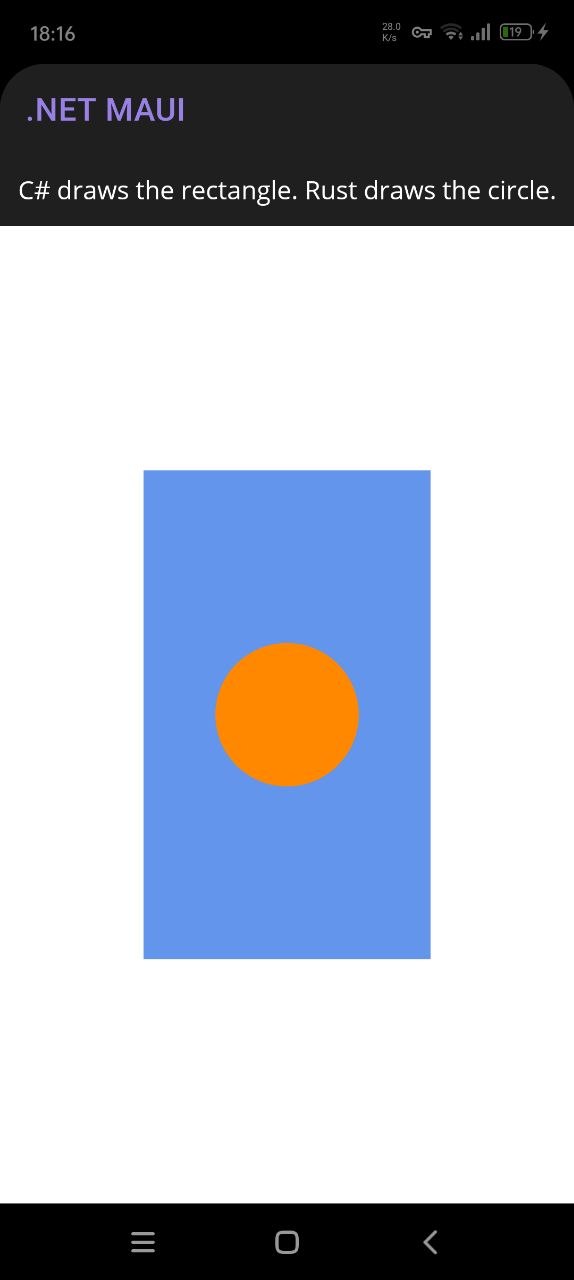
Our final sample is deliberately small: C# draws a rectangle, Rust draws a circle, and both happen on the same SkiaSharp canvas.
The circle itsself is not the point. The point is that the same bridge could just as well call into Rust for image processing, native data pipelines, geometry, or other work where you want low-level control.
Inside the generated MAUI project, we add the package reference:
1
<PackageReference Include="SkiaSharp.Views.Maui.Controls" Version="3.119.0" />
Then we enable SkiaSharp hosting in MauiProgram.cs:
1
2
3
4
5
using SkiaSharp.Views.Maui.Controls.Hosting;

builder
    .UseMauiApp<App>()
    .UseSkiaSharp();
At this point the app still builds, but it does not do anything interesting yet.
The generated sample page starts with the usual simple arithmetic demo. We will replace it with a SkiaSharp canvas:
1
2
3
4
5
6
7
8
9
10
11
12
13
14
15
<ContentPage xmlns="http://schemas.microsoft.com/dotnet/2021/maui"
             xmlns:x="http://schemas.microsoft.com/winfx/2009/xaml"
             xmlns:skia="clr-namespace:SkiaSharp.Views.Maui.Controls;assembly=SkiaSharp.Views.Maui.Controls"
             x:Class="UseSkiaSharp.MainPage">

    <Grid RowDefinitions="Auto,*">
        <Label Grid.Row="0"
               Text="C# draws the rectangle. Rust draws the circle."
               HorizontalTextAlignment="Center" />

        <skia:SKCanvasView Grid.Row="1"
                           PaintSurface="OnPaintSurface" />
    </Grid>

</ContentPage>
We make the page code-behind draw a rectangle on the C# side, then pass the same native canvas handle to Rust:
1
2
3
4
5
6
7
8
9
        //MAUI
        canvas.DrawRect(rect, _rectPaint);

        var cx = rect.MidX;
        var cy = rect.MidY;
        var radius = MathF.Min(rect.Width, rect.Height) * 0.25f;

        //RUST
        int rc = Rust.DrawCircle(canvas.Handle, cx, cy, radius, ColorArgb);
We are passing the same native SKCanvas handle to Rust and letting Rust call into Skia on that exact canvas.
Add Rust Code For Skia
The generated app starts with just rust/lib.rs. For this sample I split the Rust side into two responsibilities:
lib.rsstays the exported surface that C# callsskia.rsholds the internal Skia backend and platform-specific symbol loading
After that change, the Rust side looks like this:
1
2
3
4
5
UseSkiaSharp/
├── rust/
│   ├── Cargo.toml
│   ├── lib.rs <-- exported functions for C#
│   └── skia.rs <-- internal Skia backend and platform logic
That split keeps the public ABI small and predictable while letting the Rust implementation grow normally.
Cargo.toml stays intentionally small:
1
2
[lib]
path = "lib.rs"
RustMaui decides the Apple link strategy at build time, so the sample itself does not need to hard-code crate types in Cargo.toml.
The sample is still meant to work on Windows, Android, iOS, Mac Catalyst, and macOS, but it does not use exactly the same native-loading strategy everywhere.
On Windows, Android, macOS, and Mac Catalyst, Rust resolves libSkiaSharp dynamically through libloading. On iOS, both device and simulator builds use the static-link path instead and resolve the same sk_* symbols through normal Apple linking.
lib.rs is small. It exports only what the C# side needs and forwards the real work to the internal module:
1
2
3
4
5
6
7
8
9
10
11
12
13
14
15
16
17
18
19
20
21
22
23
24
25
26
27
28
29
30
31
32
33
34
35
36
37
38
39
40
41
42
43
44
45
46
47
48
49
use std::ffi::c_void;
use std::os::raw::{c_float, c_uint};
use std::sync::Mutex;

mod skia;

static LAST_ERROR: Mutex<Option<String>> = Mutex::new(None);

#[no_mangle]
pub extern "C" fn draw_circle(
    canvas: *mut c_void,
    cx: c_float,
    cy: c_float,
    radius: c_float,
    color_argb: c_uint,
) -> i32 {
    match skia::draw_circle(canvas, cx, cy, radius, color_argb) {
        Ok(()) => {
            *LAST_ERROR.lock().unwrap() = None;
            0
        }
        Err((code, message)) => {
            *LAST_ERROR.lock().unwrap() = Some(message);
            code
        }
    }
}

#[no_mangle]
pub extern "C" fn last_error_message(buffer: *mut u8, buffer_len: usize) -> usize {
    let guard = LAST_ERROR.lock().unwrap();
    let Some(message) = guard.as_ref() else {
        return 0;
    };

    let bytes = message.as_bytes();
    // Return the full required size even on the size-query pass so C# can allocate once.
    let required_len = bytes.len() + 1;

    if !buffer.is_null() && buffer_len != 0 {
        let copy_len = bytes.len().min(buffer_len.saturating_sub(1));
        unsafe {
            std::ptr::copy_nonoverlapping(bytes.as_ptr(), buffer, copy_len);
            *buffer.add(copy_len) = 0;
        }
    }

    required_len
}
The interesting platform work sits in skia.rs:
- Windows, Android, macOS, and Mac Catalyst use a
libloadingbackend that resolves the already-loadedlibSkiaSharpbinary at runtime. - iOS device and iOS Simulator use a separate backend with plain
extern "C"declarations, so all iOS targets follow the same static-link path.
1
2
3
4
5
6
7
8
9
10
11
12
13
14
15
16
17
18
19
20
21
22
23
24
#[cfg(any(
    not(target_os = "ios"),
    target_abi = "macabi"
))]
mod backend {
    fn lib_candidates() -> &'static [&'static str] {
        #[cfg(target_os = "windows")]
        { &["libSkiaSharp.dll", "SkiaSharp.dll"] }

        #[cfg(target_os = "android")]
        { &["libSkiaSharp.so"] }

        #[cfg(any(
            target_os = "macos",
            all(target_os = "ios", target_abi = "macabi")
        ))]
        { &["libSkiaSharp", "libSkiaSharp.dylib"] }
    }
}

#[cfg(all(target_os = "ios", not(target_abi = "macabi")))]
mod backend {
    // iOS device + simulator path: static-link backend using extern "C" declarations
}
The C# binding generator follows the same rule. On iOS, RustMaui generates Lib = "__Internal"; on Mac Catalyst it keeps the real native library name. That is why the same package builds cleanly on iPhone, iOS Simulator, and Mac Catalyst.
Code Generator At Work
This is where the current RustMaui.Generators package installed by the tool really helps.
After adding draw_circle and last_error_message to lib.rs, I built the app again and did not write any manual bindings.
The generated file came out like this:
1
2
3
4
5
6
7
8
// Rust.Generated.cs — do not edit
[LibraryImport(Lib, EntryPoint = "draw_circle")]
[UnmanagedCallConv(CallConvs = new[] { typeof(System.Runtime.CompilerServices.CallConvCdecl) })]
public static partial int DrawCircle(IntPtr canvas, float cx, float cy, float radius, uint colorArgb);

[LibraryImport(Lib, EntryPoint = "last_error_message")]
[UnmanagedCallConv(CallConvs = new[] { typeof(System.Runtime.CompilerServices.CallConvCdecl) })]
public static partial nuint LastErrorMessage(IntPtr buffer, nuint bufferLen);
And Rust.cs stayed untouched:
1
2
3
4
public static partial class Rust
{
    // Add manual bindings, helpers, or overrides here.
}
That is the ideal outcome.
The exported Rust signatures in this sample only use types the generator already understands:
*mut c_voidbecomesIntPtr*mut u8becomesIntPtrc_floatbecomesfloatc_uintbecomesuinti32becomesintusizebecomesnuint
So there was no need for a manual Rust.cs override.
It also lines up nicely with where modern .NET interop is heading: source-generated [LibraryImport] bindings are the preferred direction for NativeAOT-friendly interop, so this flow stays close to current Microsoft guidance instead of leaning on older runtime-generated patterns.
When Rust.cs Is Needed
Rust.cs is important for exception paths when the generator cannot safely decide the marshaling contract on its own.
Typical cases:
- strings like
*const c_char - more complex pointer ownership rules
- custom marshaling behavior
- signatures where you want to hand-author the import declaration
In those cases, keep the Rust export in lib.rs, then add your own [LibraryImport] declaration to Rust.cs. The generator sees the matching EntryPoint and skips generating a duplicate.
If one export needs a hand-authored binding, you can override just that one and keep generation enabled for the rest. For this sample, we didn’t use this, auto-generator worked perfectly for our code.
Rust.Generated.csis disposable and regenerated on buildRust.csis yours and survives future builds
If you want a different interop class name than Rust, set RustBindingsName in the project file:
1
2
3
<PropertyGroup>
    <RustBindingsName>MyBindings</RustBindingsName>
</PropertyGroup>
That gives you MyBindings.cs, MyBindings.Generated.cs, and a MyBindings partial class.
Cross-platform Rust
The value of RustMaui flow is that after installing prerequisites Rust code compiles and ships seamlessly on any platform we compile our .NET MAUI app.
The sample in this article is intentionally small, but demonstrated a nice cooperation between MAUI and Rust code sharing same work context.
With AI helping to replace C# with Rust code (and we should definitely take advantage of new possibilities) the demonstrated tooling opens the door to very practical uses:
- image and data processing
- codecs, parsers, and native data pipelines
- simulation or geometry-heavy work
- native API experiments where low-level control matters
Please share your thoughts in the comments, I hope this article will be useful for your projects!

Links and Resources
- UseSkiaSharp sample working sample used in this article
- RustMaui combined repo for the global tool, generator package, and template package
- Working with Rust Libraries from C# .NET Applications for a practical walkthrough for .NET + Rust
- Building with .NET and Rust: A Tale of Two Ecosystems with an ecosystem-level comparison
- Native Library Interop for .NET MAUI guidance
- Native interoperability best practices for .NET guidance around
LibraryImport, string handling, and ownership rules
The author is available for consulting and works on performance-sensitive apps, drawn applications, and custom controls for .NET MAUI. If you need help with custom UI, native interop, or performance work, feel free to reach out.